Name
dnn_view - Visualize feature maps of stimuli.
Synopsis
dnn_view -net Net -layer Layer [Layer …] -chn Channel [Channel …] [-cmap Colormap] [-vmin Vmin] [-vmax Vmax] [-show] -out Output
Arguments
Required Arguments
Argument |
Discription |
|---|---|
net |
Name of DNN Model, which should be placed in $DNNBRAIN_DATA/models with format *.pth. |
layer |
Convolution layers used to specify where activation is extracted from.E.g., ‘conv1’ represents the first convolution layerOnly support convolution layer! |
chn |
Channel numbers used to specify which channels are used to.Channel index starts from 1.Don’t support view more than 5 channels at once! |
stim |
A .stim.csv file which contains stimulus information |
Optional Arguments
Argument |
Discription |
|---|---|
cmap |
Show feature maps with the specified colormap.Default is ‘colorwarm’. |
vmin |
The minimal value used in colormap is applied in all feature maps.Default is the minimal value of each feature map for itself. |
vmax |
The maximal value used in colormap is applied in all feature maps.Default is the maximal value of each feature map for itself. |
show |
If used, display stimuli and feature maps in figures. |
Outputs
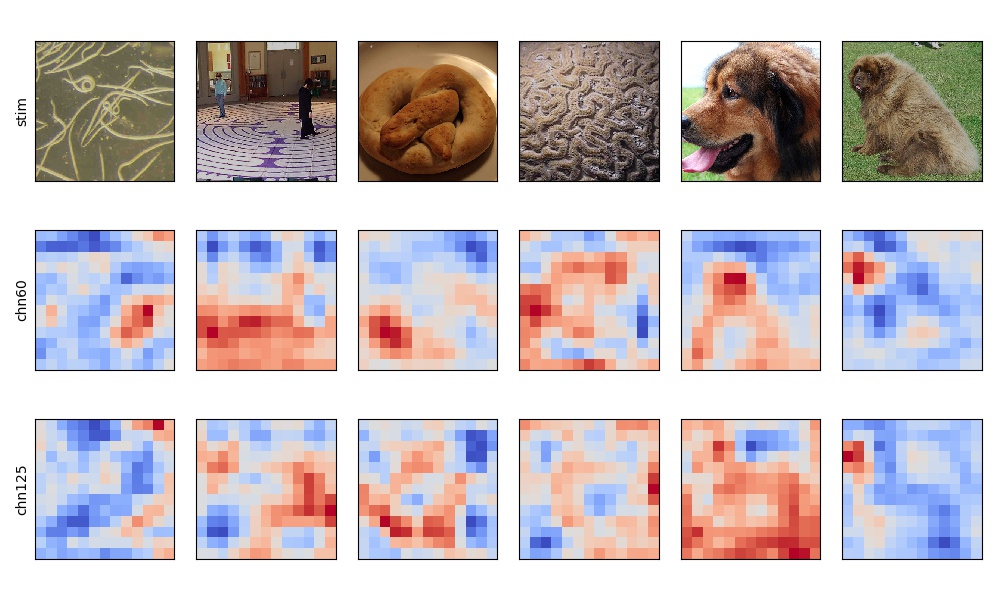
A .jpg image visualizing the original stimulus and the feature maps of required net information.
Examples
dnn_view -net AlexNet -layer conv5 -chn 60 125 -stim ./test.stim.csv -show -out ./dnn_view.act.h5
The output image is displayed as below: