Synthesize Optimal Image
There is an example to synthesize the image which can extract the highest activation of target unit. In this example we will get optimal image of channel 131 in layer fc3, which is responsible for flamingo category. There will be many detailed annotations in code.
Code
# import library
import os
from os.path import join as pjoin
from dnnbrain.dnn.models import AlexNet
from dnnbrain.dnn.algo import SynthesisImage
from dnnbrain.dnn.base import ip

# 0: Folds preparation
path = os.getcwd()

# 1:Parameter Set
# 1.1 prepare target channel
    #First save your target channel in variable
layer = 'fc3'
chn = 131

# 1.2 method
    # Next you can choose metrics for synthesizing,
    # you must decide how to compute the activation in 1.2.1
    # and for those in 1.2.2-1.2.4, they are optimal method
    # you can choose only one or combinations of many
    # which depends on your purpose and image quality.

# 1.2.1 How to compute
    # Because channels in convolutional layers has more
    # than one activation value, we provide mean and max
    # to compute the activation loss function of activation
    # map, but for fully-connected(fc) layers, the activation
    # map only has one activation.
act_meth = 'mean'

# 1.2.2 Regularization
    # Loss function =  - activation + regularization
    # where activation is the mean or max of the channel
    # and regularization constraint additional requirement
    # on the image, usually dealing with outliers in pixels.
reg_meth = 'TV' # Method name: total variance
reg_lambda = 0.01

# 1.2.3 Image Precondition
    # This type of metrics processes the whole image in every
    # iteration, often blur the image to mitigate high frequency.
pre_meth = 'GB' # Method name: gaussian blur
GB_radius = 0.3

# 1.2.4 Gradient Smooth
    # Gradient smooth works by smooth the gradient of activation,
    # gradient determines the output of image in every iteration.

sm_meth = 'Fourier' # Method name: Fourier filter
factor = 0.3

#2: Synthesize

#Get Network
dnn = AlexNet()

#prepare parameters of optimizer
lr = 0.1 #learning rate
n_iter = 150 # number of iterations

#create instance of SynthesisImage
synthesis = SynthesisImage(dnn)

#Set layer & channel
synthesis.set_layer(layer, chn)

#Set metric parameters
    # Note if you don't use some optimal ones,
    # you need to give 'None' value,
    # here we only adopt smooth_metric
    # but all the metrics should be set
synthesis.set_loss(activ_metric='mean', regular_metric=reg_meth,regular_lambda=reg_lambda)
synthesis.set_precondition(precondition_metric=pre_meth,GB_radius=GB_radius)
synthesis.set_smooth_gradient(smooth_metric=sm_meth, factor=factor)

#start synthesize
    # In this example you can omit init_image & unit if not necessary.
        # Parameter verbose is for loss printing, save_path & save_step is for interval image saving,
        # if save_path has an input but save_step is none, only the final image will be stored out.

# Save interval images in iteration
save_out_path = path
save_step = 10 # every 10 iteration save one
# Print during iteration
print_inter_loss = True

optimal_img = synthesis.synthesize(init_image=None, unit=None, lr=lr, n_iter=n_iter, verbose=print_inter_loss, save_path=save_out_path, save_step=save_step)

# Save final images
# name the image path
file_name = f'optimal_{layer}_chn{chn}.png'
file_path = pjoin(path, file_name)
# transfer to Image
img_out = ip.to_pil(optimal_img, True)
# save in the current dir
img_out.save(file_path)
# you will see the png in your current path
The optimal image of flamingo is displayed as below:
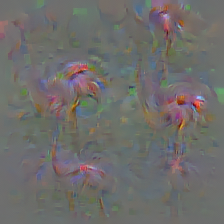
Note: usually combinations pf metrics will produce much better quality, but more parameters should be searched.